Elevator service software is the system an elevator contractor runs on. It keeps every building, elevator and maintenance contract in one place, sells and schedules the work, sends mechanics to calls, captures their time on tickets, invoices your contracts and shows profit by job. Zip OS is elevator service software that runs CRM, dispatch, scheduling, time tickets, job costing and maintenance contract billing for elevator contractors.
This guide covers what the category is, what makes elevator work different, the seven jobs your software has to do, and a checklist you can use when you compare options.
What is elevator service software?
Elevator service software (also called elevator service management software or elevator company software) is the one system the office, the field and the owner all work from. The work lives there, instead of in spreadsheets, whiteboards, group texts and paper tickets.
It serves three groups of people at once:
- The office: dispatch, scheduling, billing and sales staff who need to know what’s happening, where, and what to charge.
- The field: mechanics who want to spend their time on elevators, not paperwork.
- The owner and service manager: who need to see pipeline, backlog, callbacks and profit without waiting for a report.
If a tool only serves one of those groups, the other two end up re-typing what it knows.
What makes elevator work different from other field service?
Most field service software is built around a customer, an address and a one-time visit. Elevator companies don’t work that way.
| What you run | A generic field service tool sees | Elevator service software should see |
|---|---|---|
| A customer | A contact and an address | A building with every car, its equipment and its contract |
| An elevator | Not much, maybe a note | An equipment record per car, with history and inspection reports |
| Revenue | One-off jobs | Maintenance contracts with recurring visits and price schedules |
| Urgent work | A rush appointment | Entrapments, callbacks and shutdowns that need the right mechanic now |
| Big projects | A long appointment | Modernizations with budgets, change orders and percent complete |
| New sales | A sales rep’s pipeline | Repair leads that start with a mechanic’s photo |
That’s why elevator contractors who use general tools end up with workarounds: a spreadsheet for equipment, another for contracts, a group text for callbacks. Software built for elevators starts with those records.
What jobs should elevator service software do?
Think of it as the life of a job, from the first lead to the final invoice. Good elevator service software covers all seven of these steps and connects them, so each one picks up where the last left off.
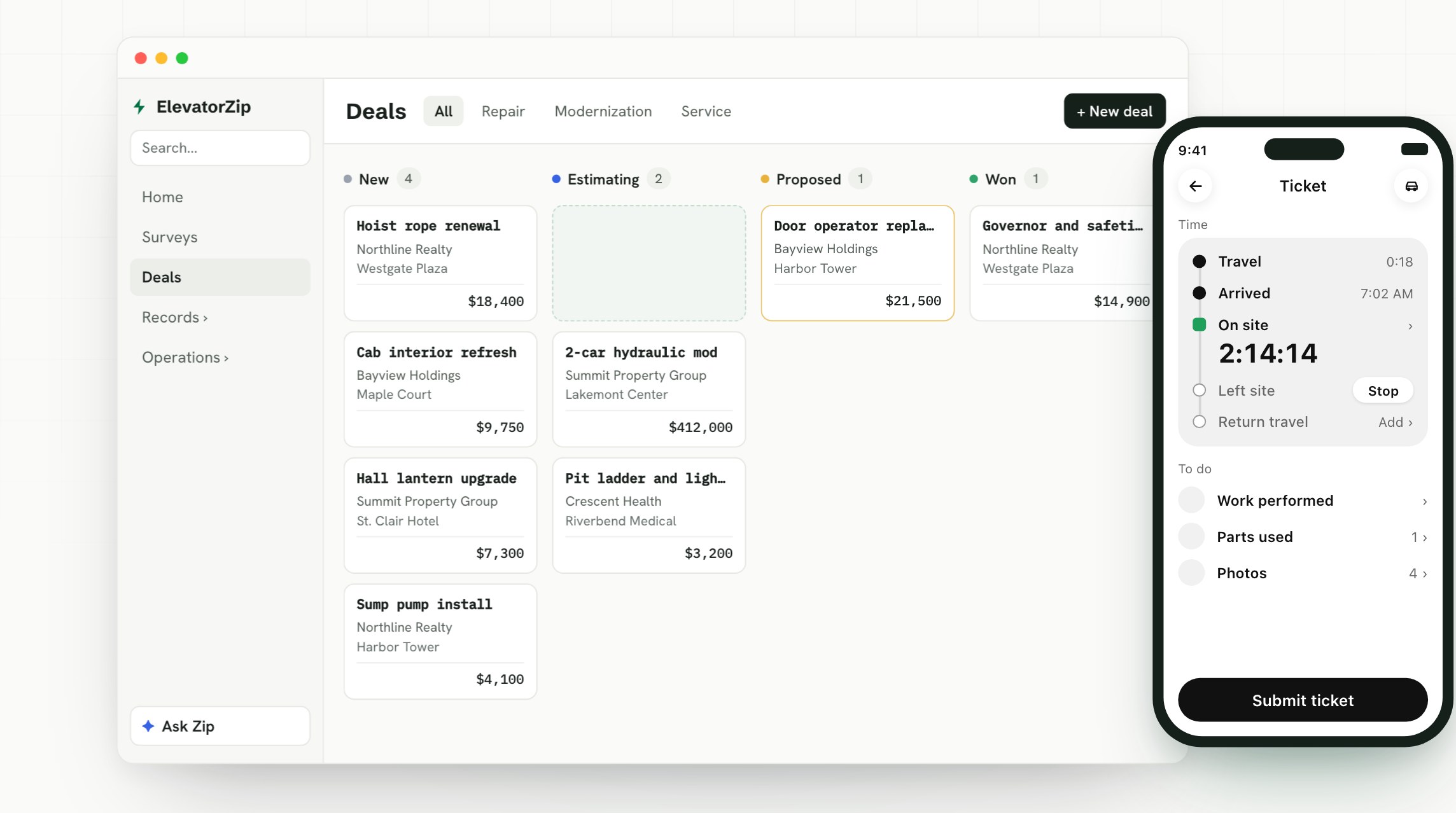
1. CRM, deals and pipeline
Every building, car, contact and contract, plus the deals you’re working on: repairs, modernizations and new service. The CRM should know which elevators are under contract and which ones you could be selling. Read more in what a CRM for elevator companies should do.
2. Surveys, estimates and proposals
A mechanic’s photos and field survey should flow straight into an estimate, then a proposal the customer signs online. Supplier quote requests should go out from the same record, with the parts and photos attached.
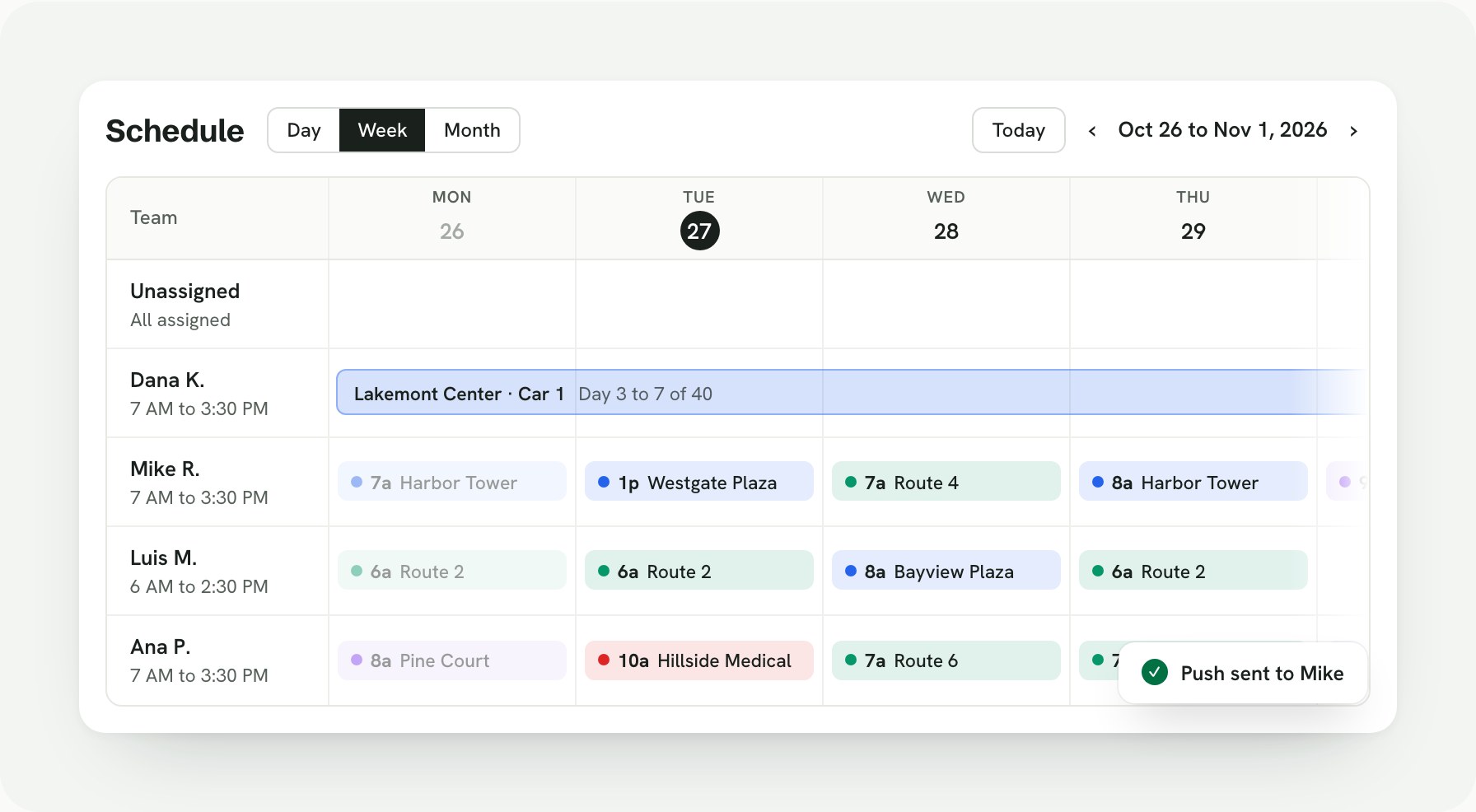
3. Scheduling and dispatch
A calendar the office can drag jobs around on, recurring maintenance that lands on routes by itself, and dispatch for calls and callbacks. When an entrapment comes in, you need an on-call schedule, a push notification to the mechanic, and escalation if nobody picks it up. More in our guide to dispatch software for elevator companies.
4. The mechanic app and time tickets
The app has to be simple enough that mechanics use it, and it has to work offline in machine rooms and hoistways. Time should be captured on the ticket the mechanic already has open: travel, arrival, on-site time, return travel, work performed, parts and photos. See how elevator mechanic time tracking works in Zip OS.
5. Maintenance contracts and billing
Maintenance contracts are the base of most elevator companies. Your software should know what each contract covers, schedule the recurring work, invoice on the contract’s terms, handle price changes over the years, and send invoices to your accounting system. More on contract billing and QuickBooks.
6. Projects and job costing
Modernizations and large repairs need budgets, tasks, change orders, purchase orders and percent complete. When a mechanic submits a time ticket, the hours should land on the job, so you see cost against budget while the work is still going. Read how elevator job costing works.
7. Reporting and answers
Owners want answers, not report builders. What’s in the pipeline? Which buildings have the most callbacks? Which contracts make money? In Zip OS, Ask Zip answers questions like these in plain English from your live records, and it can make changes when you approve them.
Elevator service software checklist
Use this table when you compare options. Ask to see each item live, on a realistic example, not on a slide.
| Must have | Why it matters | In Zip OS |
|---|---|---|
| Buildings, cars and equipment records | Every sale, call and invoice ties back to a building and a car | Yes |
| CRM, deals and pipeline | Repairs and mods need a sales process, not a spreadsheet | Yes |
| Photos that fill in surveys and estimates | The field already knows the details, so the office shouldn’t re-type them | Yes |
| Proposals with e-signature | Faster yes from the customer, and the job books itself | Yes |
| Drag-and-drop scheduling and routes | Plan the week in minutes, see who’s where | Yes |
| Dispatch, on-call and escalation | Entrapments and callbacks can’t wait for someone to see an email | Yes |
| Offline mechanic app with time tickets | Machine rooms and hoistways rarely have signal | Yes |
| Maintenance contracts and contract billing | Recurring revenue invoiced on the contract’s terms | Yes |
| Job costing and percent complete | Know if a mod is making money before it’s done | Yes |
| QuickBooks | Invoices land in your books without re-typing | Yes |
| Plain-English answers | Owners get numbers without building a report | Yes, with Ask Zip |
| Setup and training included | A system only works if your team uses it | Yes |
For a deeper version you can take into a demo, use our 12 questions to ask in an elevator software demo.
How does Zip OS work as elevator service software?
Zip OS is built around the life of a job:
- Find the work. A mechanic snaps a photo of a part, finds it across 10 million+ parts, and sends a repair lead to the office.
- Win the job. The lead becomes an estimate and a proposal in a few clicks. The customer e-signs, and the job books itself.
- Run the job. Drag the job onto the calendar, break it into tasks, and Zip OS keeps every mechanic in the loop with push notifications.
- Track costs. Time tickets and materials post to the job, so you see cost and percent complete as the work happens.
- Invoice it. Contract and job invoices go out, and they go to QuickBooks with one button.
- Ask Zip. Ask about anything from pipeline to profit and get the answer from your live records.
It’s known as the CRM that fills itself out, because photos from the field fill in surveys, estimates, proposals and equipment records. And it includes everything in Zip Repair, the field app for repair sales, so your mechanics get part search and commission from day one. Not sure which you need? See Zip OS vs. Zip Repair.
Is it ERP, CRM or service software?
You’ll see all three labels when you search. A CRM helps you win the work: buildings, contacts, repair leads, deals and proposals. An ERP helps you do the work and get paid: contracts, scheduling, time, parts, job costs, invoices and the books. Elevator service software is what the two look like when they’re built for elevator companies.
Zip OS, ElevatorZip’s full system, is both an ERP and a CRM when it’s integrated with QuickBooks Online. Zip OS runs the sales and the work, and QuickBooks keeps the books. We break down the differences in ERP vs. CRM for elevator companies.
Frequently asked questions
What is elevator service software?
Elevator service software is the system an elevator contractor runs the business on. It keeps a record of every building, elevator and maintenance contract, sells and schedules the work, dispatches mechanics to calls, captures their time on tickets, invoices your contracts and jobs, and shows profit by job. It is also called elevator service management software or elevator company software.
What should elevator service software include?
At a minimum: a CRM built around buildings and elevators, surveys, estimates and proposals with e-signature, scheduling and dispatch, a mechanic app with time tickets that works offline, maintenance contracts and contract billing, job costing, and reporting. It should connect all of these so nothing gets typed twice.
How is elevator service software different from general field service software?
Elevator work is organized around buildings with several cars, each with its own equipment record, and most revenue comes from maintenance contracts. Elevator companies also handle entrapments, callbacks, shutdowns and modernizations that run for weeks. General field service tools are built around a customer address and a one-time visit, so they need heavy setup to handle any of that.
What is the best software for elevator companies?
The best software for an elevator company is one built for elevator work from the start: buildings, cars, equipment, contracts, callbacks and mods, with a mechanic app people actually use. Zip OS is elevator service software that runs CRM, dispatch, scheduling, time tickets, job costing and maintenance contract billing for elevator contractors.
Is Zip OS elevator service software?
Yes. Zip OS is ElevatorZip’s full system for elevator contractors. It runs CRM, scheduling, dispatch, time tickets, job costing, contract billing and invoicing, and when it’s integrated with QuickBooks Online, it’s both an ERP and a CRM.
Does Zip OS work with QuickBooks?
Yes. Zip OS connects to QuickBooks Online. Invoices and purchase orders go to QuickBooks when someone on your team presses a button, and payments come back to Zip OS on their own.
How do I see Zip OS for my elevator company?
Book a 30-minute demo and we’ll walk through it on your own buildings.
See elevator service software built for elevator companies. Book a 30-minute Zip OS demo.