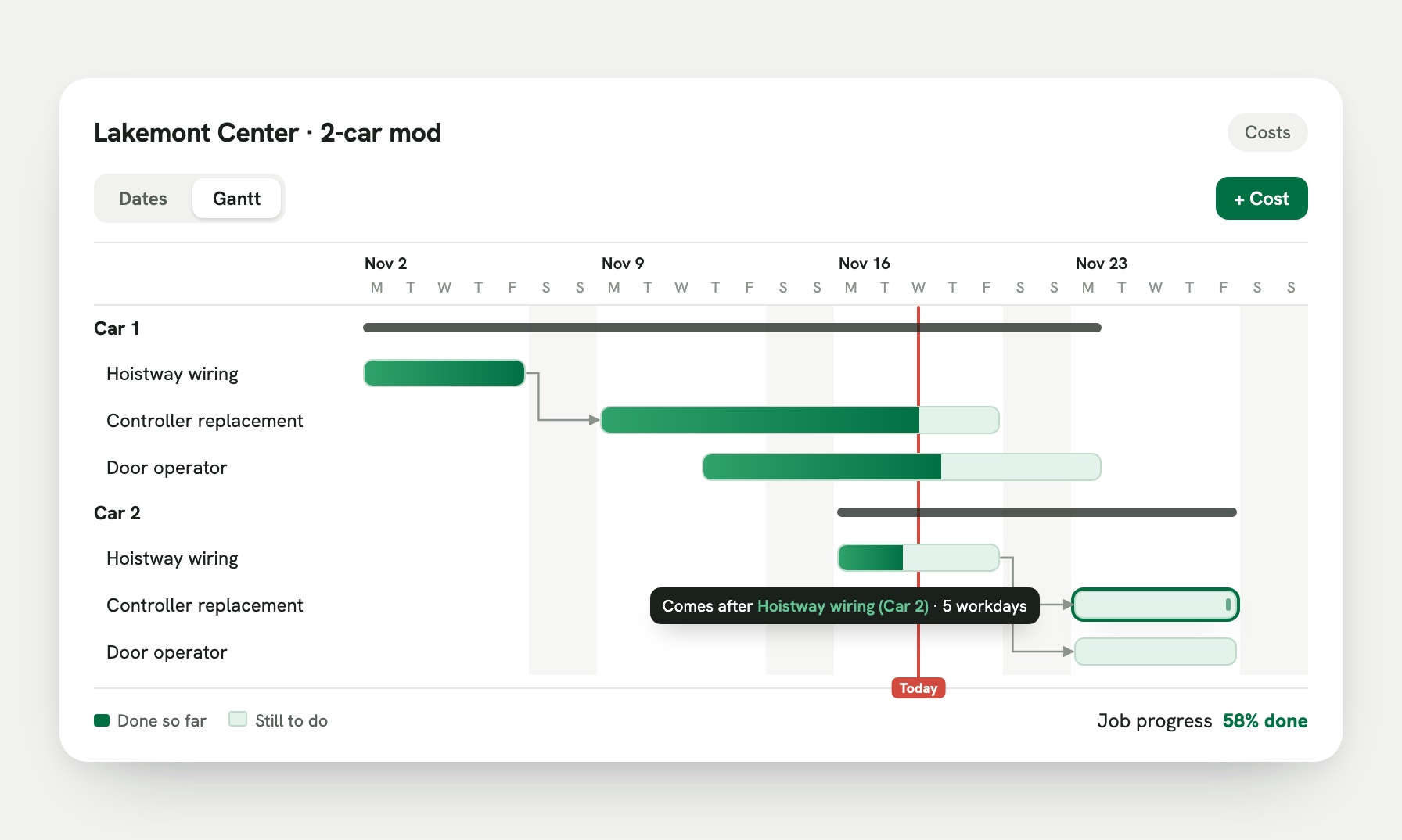
Elevator job costing tells you whether a modernization or repair is making money while it’s still running, not after it’s closed. Every hour, part and purchase order posts to the job, so you see budget, cost so far and percent complete on each car. In Zip OS, every job has a Costs tab that does this for you, and a Gantt view that shows when each piece of work happens.
This guide covers why mods lose money, what good job costing looks like, and how it works in Zip OS from the signed proposal to the last invoice.
Why do elevator jobs lose money?
Most elevator contractors find out a job lost money weeks after it’s done. By then, the crew has moved on and there’s nothing left to fix.
The usual causes:
- Hours run over. A door operator that was bid at 40 hours takes 65, and nobody sees it until payroll.
- Parts cost more than the bid. A controller price goes up between the proposal and the order.
- Change orders slip. Extra work gets done in the field but never gets approved or billed.
- Costs live in three places. Hours are on paper tickets, parts are in the accounting system, and the budget is in a spreadsheet.
Good job costing fixes all four by putting the budget and the real costs side by side, on the job, as the work happens.
What should elevator job costing show?
For every job, and for every car or phase inside it, you should be able to answer five questions at a glance:
| Question | What to look at |
|---|---|
| What did we plan to spend? | The budget from the signed proposal |
| What have we promised to spend? | Purchase orders that are issued but not received yet |
| What have we actually spent? | Hours from time tickets, received parts and paid costs |
| What’s left? | Budget minus committed and spent |
| How far along are we? | Percent complete by piece of work |
If your software can’t show those five on one screen, someone is building a spreadsheet on the side.
How does job costing work in Zip OS?
Zip OS follows the life of a job, so costing starts before the first hour is worked.
1. The budget comes from the proposal
When the customer e-signs, you create the job from the won deal. Zip OS reads the signed proposal: each tab becomes a section of the job (Car 1, Car 2, Machine room) and each line becomes its budget. Nobody re-types the bid.
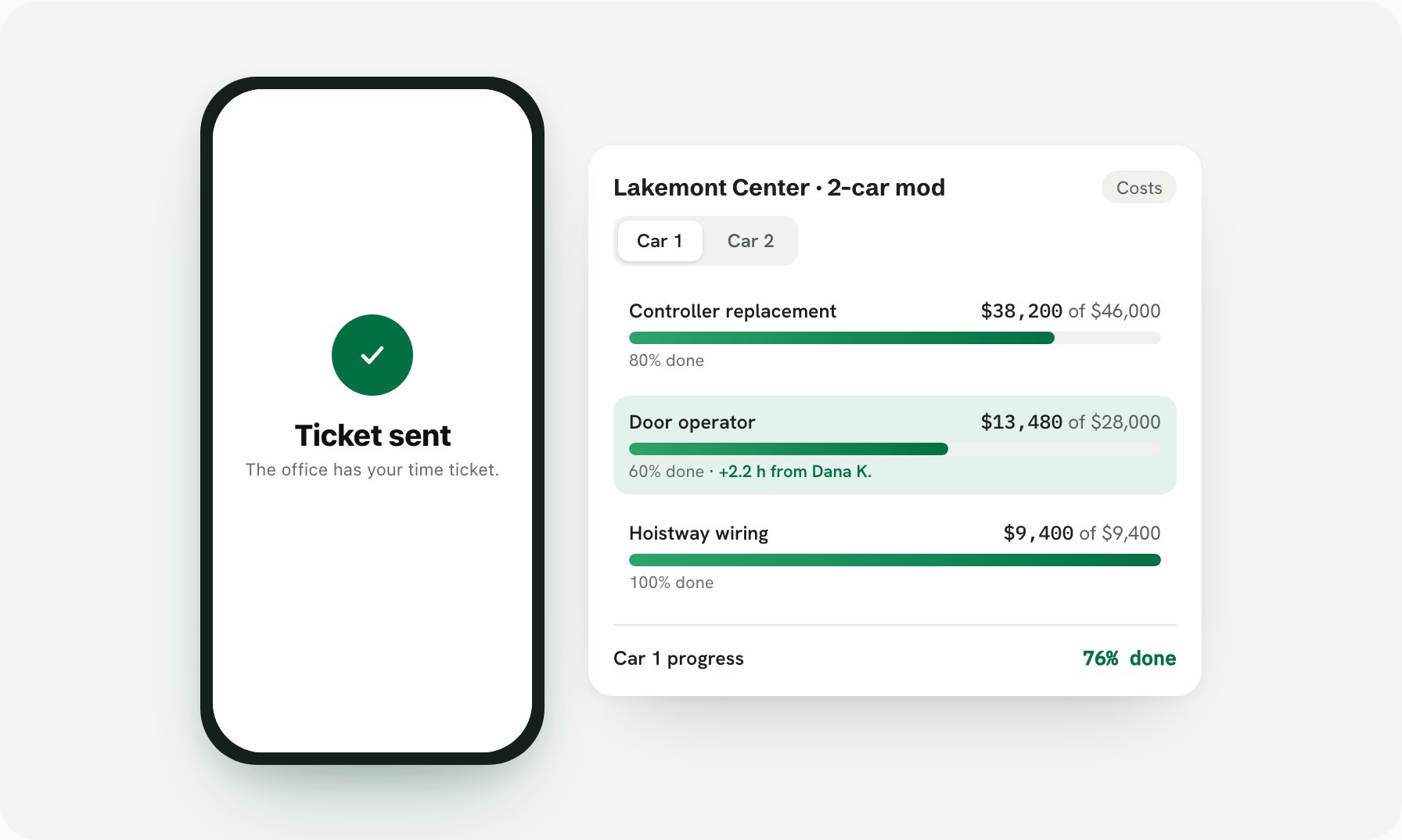
2. Every line shows Planned, Committed, Spent and Left
On the job’s Costs tab, each piece of work shows its money in plain words: what you planned, what’s committed on purchase orders, what’s spent, and what’s left. A small note under each line says where the number came from, like the POs on it or the hours logged.
To add a cost, press + Cost and pick what happened: plan a cost, order it, already paid, or used from stock.
3. Mechanics’ hours post to the job on their own
When a mechanic submits a time ticket on their phone, the hours land on the job and the piece of work they were on. The office sees cost and percent complete move the same day. See how elevator mechanic time tracking works.
4. Purchase orders move from committed to spent
Purchase orders are charged to the job line by line. When a PO is issued, it shows as committed. When the parts arrive and you receive it, it becomes spent. You always know what’s still coming.
5. Change orders update the budget
Extra work gets a change order on the job, with Approve and Reject. Once it’s approved, the job’s budget and contract amount update, so your margin reflects the real scope.
6. The Gantt view shows when the work happens
Press Gantt on the Costs tab and the same lines turn into bars across the days. Drag a bar to move it, drag its edge to change how many workdays it takes, and set what each piece comes after. If the doors on Car 1 slip a week, the work that waits on them moves too. Late work is easy to spot, and weekends are skipped.
7. One view of every open job
Owners can see every open project at once: how far along each one is, spend against the work, and margin against the bid. The WIP report shows earned revenue and over and under billing, ready for your accountant.
Ask Zip about your jobs
You don’t have to open a report to get an answer. Ask Zip in plain English:
- “Which mods are over budget on labor?”
- “What’s committed but not received on the Lakemont job?”
- “Push the Car 2 controller install back a week.”
Ask Zip answers from your live records and makes changes when you approve them. More on connecting Claude and ChatGPT to Zip OS.
Job costing and QuickBooks
Zip OS connects to QuickBooks Online. Invoices and purchase orders go to QuickBooks when someone on your team presses a button, so the job’s costs and your books match. Zip OS runs the work, and QuickBooks keeps the books. That pairing is why Zip OS is both an ERP and a CRM; see ERP vs. CRM for elevator companies.
Frequently asked questions
What is elevator job costing?
Elevator job costing is tracking what a modernization or repair job is costing you against what you bid, line by line, while the job is running. Labor hours from time tickets, parts on purchase orders and other costs post to the job, so you can see budget, cost so far, what’s left and percent complete at any time.
Why do elevator contractors lose money on modernizations?
Usually because nobody sees the overrun until the job is closed. Hours run over on one car, a part costs more than the bid, or a change order never gets approved and billed. When costs only show up at month end, it’s too late to fix them on that job.
How does Zip OS track job costs?
Every job in Zip OS has a Costs tab. The budget comes from the signed proposal, with a section for each car or phase. Mechanics’ time tickets post their hours to the job, purchase orders show as committed cost when they’re issued and spent cost when they’re received, and each line shows planned, committed, spent and left.
Can I schedule a modernization in Zip OS?
Yes. The Costs tab has a Gantt view that shows the same work as bars across the days. Drag a bar to move it, drag its edge to change how many workdays it takes, and set what each piece comes after. When one piece moves, the work that depends on it moves with it.
Does Zip OS handle change orders?
Yes. Change orders live on the job with Approve and Reject, and an approved change order updates the job’s budget and contract amount so your margin stays honest.
Does job costing in Zip OS work with QuickBooks?
Yes. Zip OS connects to QuickBooks Online. Invoices and purchase orders go to QuickBooks when someone on your team presses a button, so job costs and your books stay in step without re-typing.
How do I see job costing in Zip OS?
Book a 30-minute demo and we’ll walk through a modernization from signed proposal to final invoice.
See if your next mod is making money while it’s still running. Book a 30-minute Zip OS demo.