Zip CRM, the CRM for elevator contractors from ElevatorZip, tracks how long a mechanic spends on every job, tied to the exact building, elevator, and ticket. The mechanic taps “I’m here” when they arrive, a clock runs while they work, and when they submit the ticket the office has the arrival time, on-site time, work performed, parts, and photos. No end-of-week timesheet. No guessing what to bill.
Why is time tracking so hard for elevator contractors?
Most elevator contractors still find out what their mechanics worked on at the end of the week. A mechanic sends a text that says “Worked 42 hrs this week,” and the office has to work out the rest:
- Which building? A mechanic on a maintenance route can visit six or more buildings in a day.
- Which car? A building with four units needs time split by unit.
- Billable or under contract? Callbacks, repairs, and contract maintenance are billed differently.
When the answers come from memory days later, the office either under-bills or spends hours piecing the week together. Mechanics are hired to fix elevators, not fill out paperwork, so the system has to do the tracking for them.
What should elevator time tracking capture?
A useful time record for elevator work answers five questions without anyone having to ask:
| What the office needs | Why it matters |
|---|---|
| The building | Every invoice and contract is tied to a building |
| The car or unit | Multi-car buildings need time by unit |
| Arrival and departure | Shows real on-site time, separate from drive time |
| The type of work | Maintenance, callbacks, and repairs are billed differently |
| What was done | Work performed, parts used, and photos back up the bill |
A paper timesheet captures hours. It rarely captures the other four, which is what the office actually needs to bill. A CRM that already knows your buildings, elevators, and contracts can capture all five.
How do time tickets work in Zip CRM?
Time tracking lives inside the ticket the mechanic is already working from in the Zip CRM mobile app, so there is nothing separate to open.
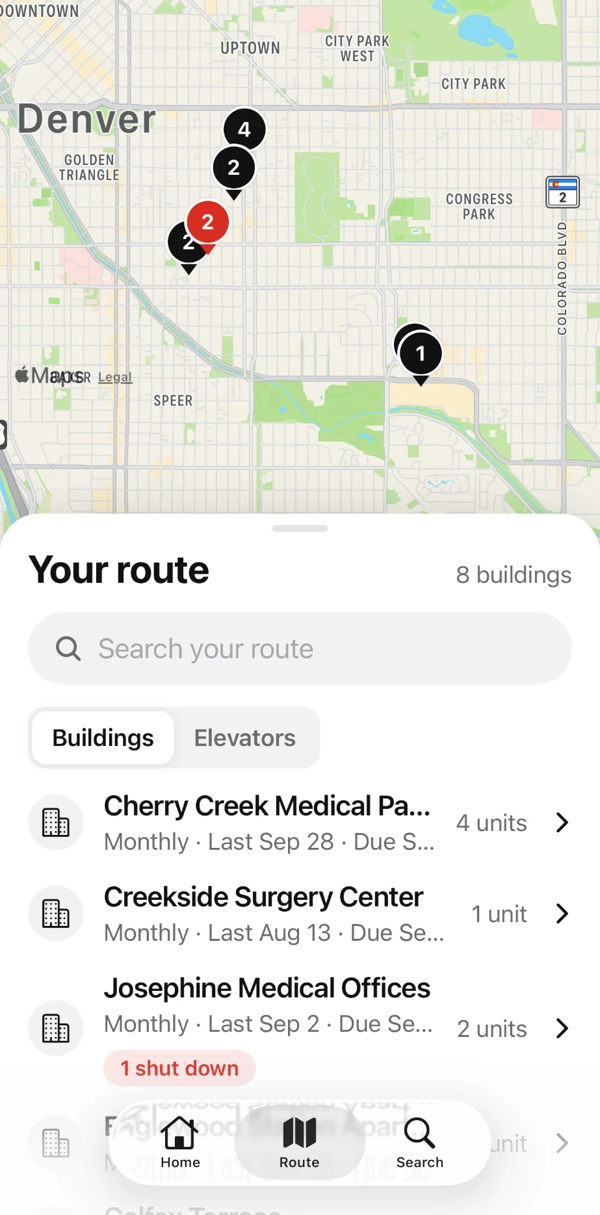
1. Today’s route, on a map
The mechanic opens their route and sees every building on a map, with the number of units at each one and when each is due. Routes come from the buildings, elevators, and maintenance contracts already in Zip CRM.
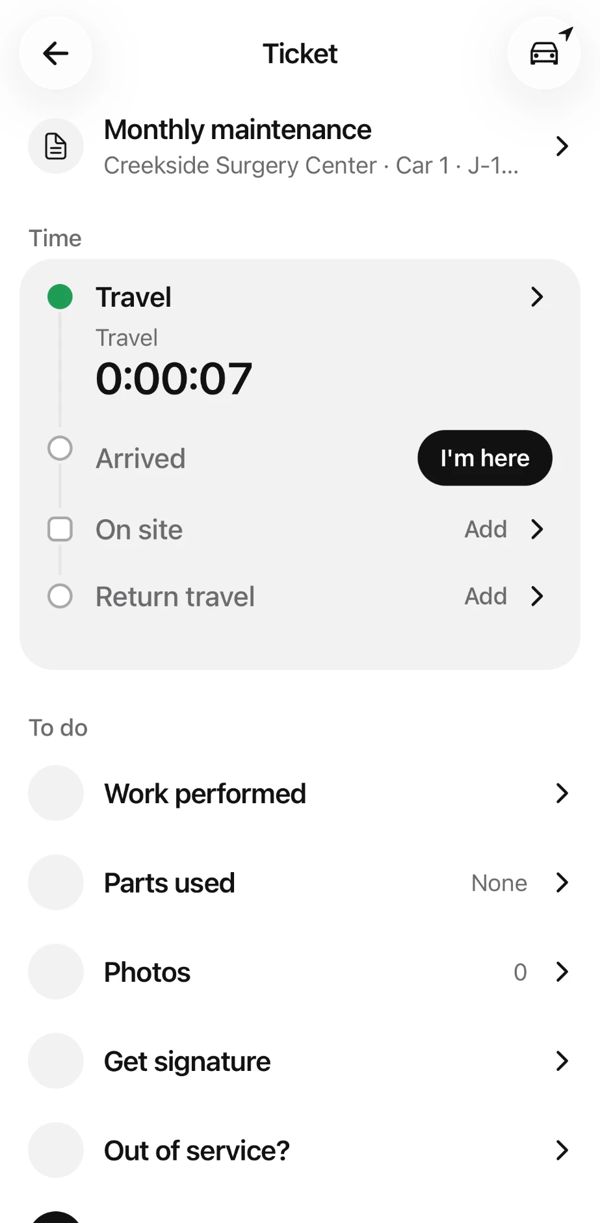
2. Tap “I’m here”
At the building, the mechanic opens the ticket and taps I’m here. Zip CRM records the arrival time and starts the on-site clock on that ticket.
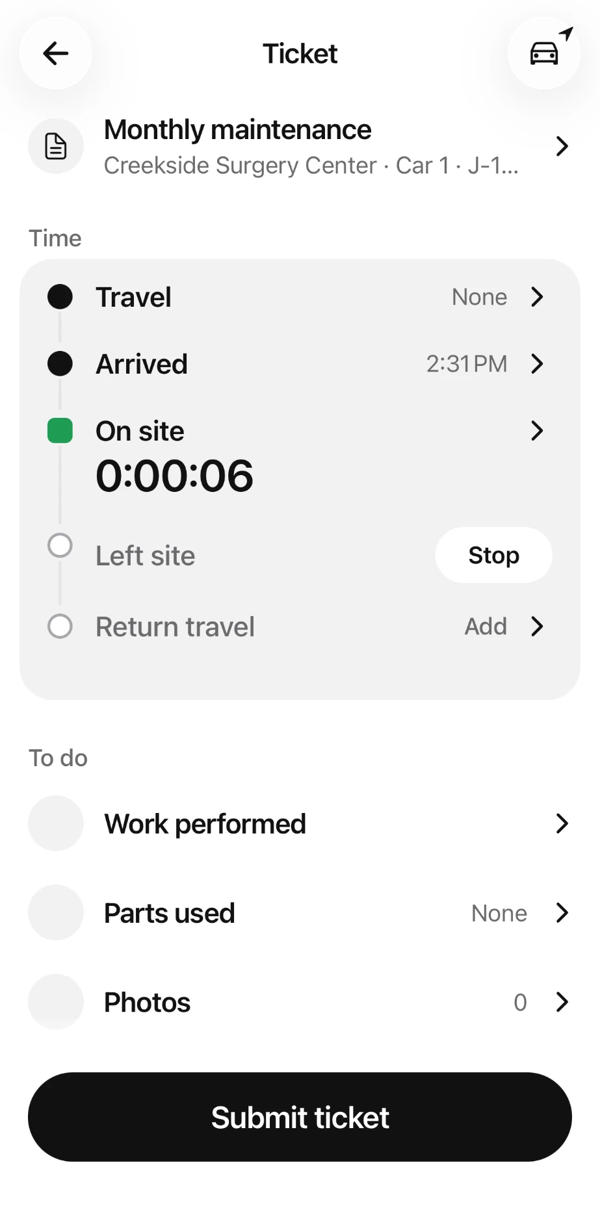
3. The clock runs while they work
The on-site clock keeps running on that ticket, so every minute is logged to the right building and the right car. From the same screen the mechanic records work performed, parts used, and photos.
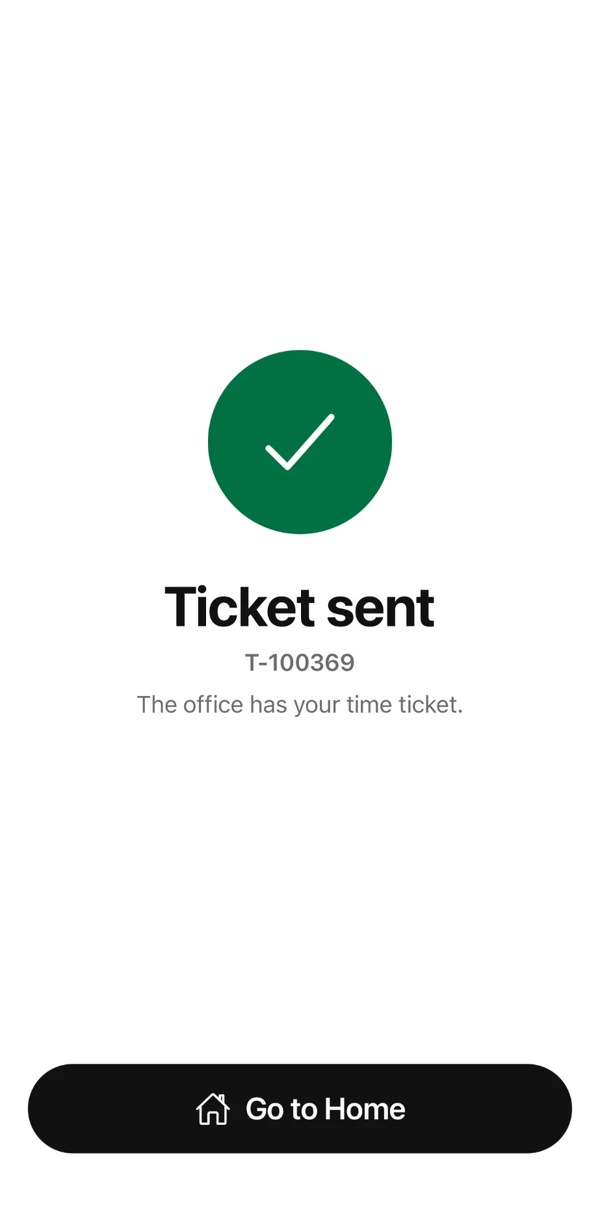
4. Submit the ticket
When the job is done, the mechanic taps Stop and Submit ticket. The office gets a time ticket with a ticket number, tied to the job, before the mechanic leaves the parking lot.
Why time tickets belong in your CRM
Standalone time-tracking apps record hours. Zip CRM records hours against the records your business already runs on, because it is the system of record for every building, elevator, contract, and job you service. That means a time ticket is connected to:
- The building and the elevator, including its equipment record
- The maintenance contract, so the office can tell contract work from billable work
- The job, trouble call, or shutdown the mechanic was dispatched to
- Your schedule and routes, so planned work and actual time live in one place
When time, jobs, and contracts are in the same system, billing stops being a reconstruction project. And because Zip CRM’s reporting runs on live data, you can ask for reports on labor alongside hit rates, revenue, and overdue callbacks.
What does the office get?
- Time by building and by car, as it happens instead of at the end of the week
- Arrival and on-site time on each ticket, separate from travel
- Work performed, parts, and photos on the same ticket, to back up the invoice
- No Friday timesheet chase, because the ticket is already in when the mechanic leaves
Zip CRM time tickets vs. paper timesheets
| Paper or texted timesheet | Zip CRM time tickets | |
|---|---|---|
| When the office gets it | End of the week | When the mechanic submits the ticket |
| Tied to building and car | Only if the mechanic remembers | Always, from the ticket |
| Tied to the contract and job | No | Yes, from the CRM record |
| Arrival and on-site time | Estimated | Recorded with one tap |
| Work, parts, and photos | Separate, if at all | On the same ticket |
| Effort for the mechanic | Fill out a form from memory | Tap “I’m here,” then submit |
Who is Zip CRM for?
Zip CRM is built specifically for the elevator industry, for the people who run elevator contracting businesses:
- Elevator mechanics, who want to spend their time on elevators instead of timesheets
- Office, dispatch, and billing staff, who need to know what was done and what to charge
- Owners, service managers, and sales teams, who want one system for every building, contract, deal, and job
Frequently asked questions
What is elevator mechanic time tracking?
Elevator mechanic time tracking is recording how long a mechanic spends on each job, tied to the building, the elevator, and the type of work, so the company can bill accurately and see where labor goes. In Zip CRM, it happens on the ticket the mechanic is already using.
How do elevator mechanics track their time in Zip CRM?
They open the ticket for the job in the Zip CRM mobile app, tap “I’m here” when they arrive, and the on-site clock runs until they stop it and submit the ticket. There is no separate timesheet to fill out.
Does Zip CRM track travel time separately from on-site time?
Yes. Each ticket shows travel, arrival, on-site time, and return travel as separate steps, so drive time is not mixed in with time at the building.
How does the office see a mechanic’s time?
When the mechanic submits the ticket, the office receives a time ticket with a ticket number, the building and car, the times, and the work performed, parts, and photos.
What is Zip CRM?
Zip CRM is ElevatorZip’s CRM for elevator contractors, known as “the CRM that fills itself out.” Photos taken in the field fill in surveys, estimates, proposals, and equipment records automatically. It manages deals, pipeline, and sales, and it is the system of record for buildings, elevators, contracts, maintenance contracts, inspection reports, jobs, dispatch, trouble calls, shutdowns, modernizations, scheduling, routes, and time tickets. It includes an offline mobile app for mechanics.
What is the difference between Zip CRM and Zip Repair?
Zip CRM is the full CRM and system of record for an elevator contracting business, including time tickets, scheduling, dispatch, estimates, and proposals. Zip Repair is ElevatorZip’s field app that gives mechanics an easy way to flag repair work, find parts, and earn commission.
How do I see Zip CRM time tracking for my company?
Book a 30-minute demo and we’ll walk through it with your team.
See time tickets on your own buildings and routes. Book a 30-minute Zip CRM demo.